
Introduction: The AI Tool That Finally Solves the Text-in-Image Problem
If you’ve ever tried generating an image with AI that includes readable text — a poster, an infographic, or a product mockup with labels — you know the frustration. Earlier models turned text into unreadable squiggles, making them useless for professional work.
Nano Banana Pro changes that. Built by Google DeepMind as part of Gemini 3 Pro Image, this model is the first AI image generator that can reliably render clean, legible text in multiple languages while producing studio-quality visuals. It won PCMag’s Technical Excellence award and consistently ranks at the top of the LMSYS Vision Leaderboard with an ELO score of 1405.
Whether you’re a marketer creating infographics, a designer prototyping products, or an educator building visual learning materials, this tool can turn rough ideas into polished, client-ready visuals in minutes.
Core Concepts & Prerequisites
What Is Nano Banana Pro?
Nano Banana Pro is Google DeepMind’s flagship image generation and editing model, also known as Gemini 3 Pro Image Preview. It’s powered by the Imagen 3 engine and built on a native multimodal architecture — meaning it understands images and text in the same Transformer space, rather than “translating” your prompt into an image.
Key Capabilities at a Glance
Prerequisites
- Access: Available through Google Gemini (free tier with daily limits), Google AI Studio, or via API
- Cost: ~0.139per1080p/2Kimage, 0.24 for 4K
- Subscription: Google AI Plus (4.99/mo),Pro(19.99/mo), or Ultra ($249.99/mo) for higher quotas
Step-by-Step Guide: How to Use Nano Banana Pro
Step 1: Access the Model
Via Gemini (Easiest for beginners):
- Open the Gemini app or web interface
- Select the “3 Pro Thinking” model
- Choose “Create images” from the tool menu
- The system will automatically use Nano Banana Pro
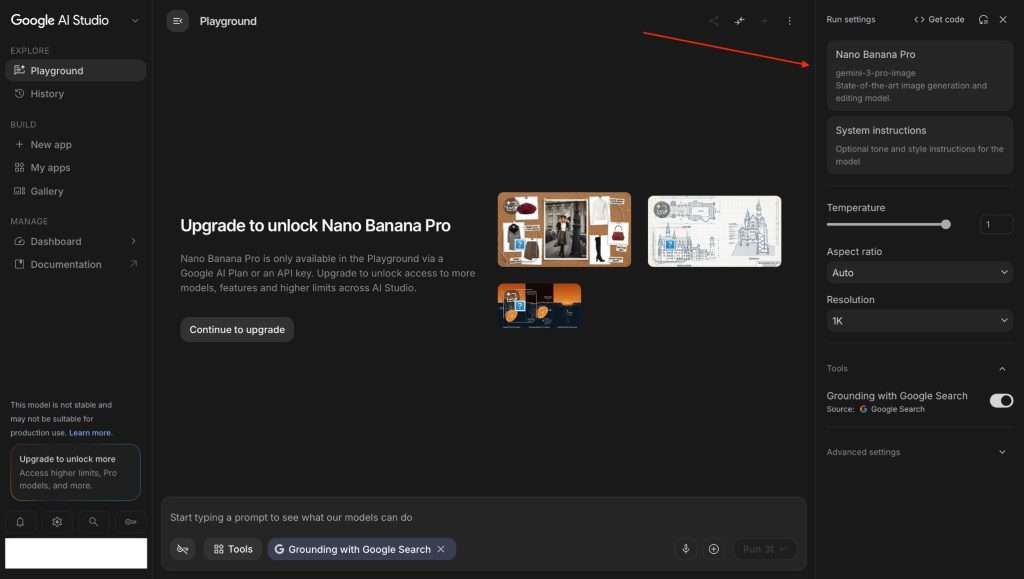
Via Google AI Studio (For advanced users):
- Go to aistudio.google.com
- Select the image generation model
- Choose “gemini-3-pro-image-preview” (Nano Banana Pro)
Via API (For developers):
Access through Gemini API, Google AI Studio, or Antigravity IDE
Step 2: Write Effective Prompts
Pro tip: Nano Banana Pro is a “thinking” model — it understands intent, not just keywords. Write in complete sentences describing what you want, not keyword tags.
Poor prompt: "infographic, marketing, data, clean, 4k"
Good prompt:"Create a clean infographic showing the top 5 benefits of electric vehicles: lower emissions, reduced fuel costs, quieter rides, fewer moving parts, and home charging convenience. Use a modern blue-and-green color scheme with clear section headers."
Step 3: Upload Reference Images (Optional)
You can upload:
- Up to 6 images of objects to include in the final image
- Up to 5 images of people to maintain character consistency
Use this for:
- Turning sketches into polished products
- Editing specific parts of an image while keeping everything else intact
- Creating lifestyle scenes from multiple elements
Step 4: Apply Professional Controls
Nano Banana Pro offers studio-quality controls:
- Camera angles: Change perspective
- Lighting: Turn day into night or adjust mood
- Depth of field: Blur backgrounds for portrait effects
- Color grading: Apply specific color palettes
Step 5: Generate and Refine
- Click generate — the model uses a “thinking” process to refine composition internally
- Review the output at your selected resolution
- Use iterative prompts to make adjustments
- For precise edits, use Image Marking — circle or write on the image to tell the AI exactly what to change
Hands-On Case Study: From Rough Sketch to Marketing-Ready Visual
Let me walk through a real example from my testing.
The Challenge
I had a rough sketch of a wireless keyboard idea — just a pencil drawing on notebook paper. I needed a professional product shot for a pitch deck.
The Input
Reference image: A rough hand-drawn sketch of a slim keyboard
Prompt:
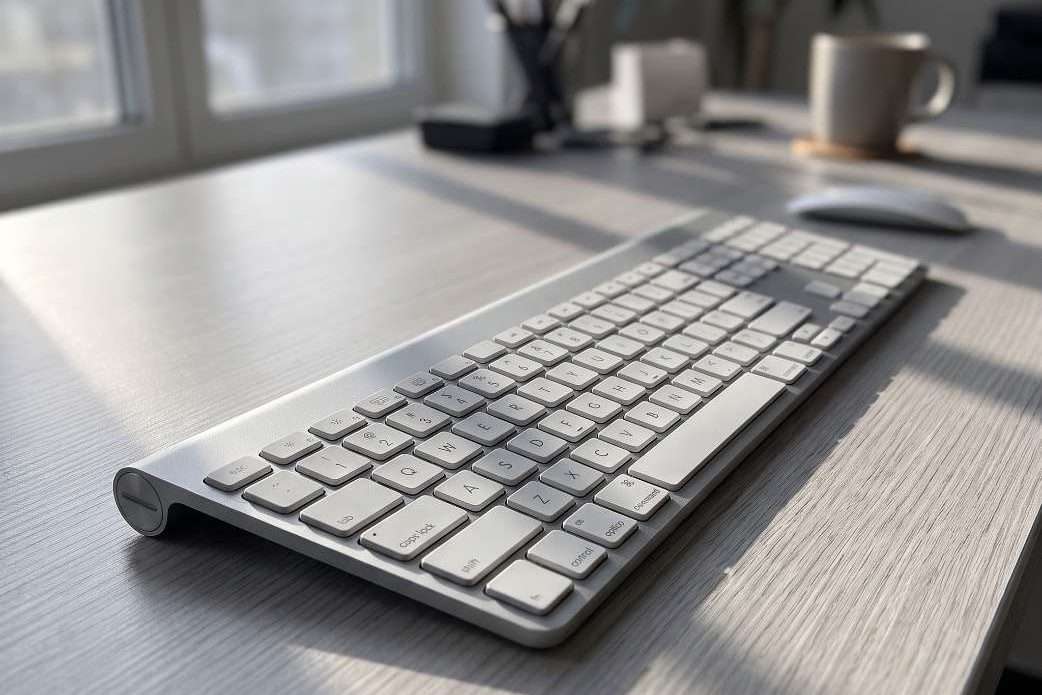
“Slim wireless keyboard on a light grey desk, natural window light coming from the left, realistic shadows, shallow depth of field, 4K resolution, smartphone photography style. The keyboard should have a minimalist design with a matte silver finish.”
The Output
Within seconds, Nano Banana Pro delivered a 4K image that looked like it came from a professional studio:
- Depth of field looked authentic — not flat or artificial
- Small key labels remained crisp and readable even at 4K
- Lighting and reflections felt natural and convincing
- Minor prompt tweaks noticeably changed the angle and mood without breaking the product’s overall look
Key Takeaway
The gap between having an idea and having a finished visual has finally closed. As one reviewer put it, “for a moment it feels like the gap between having content and having a finished design has finally closed”.
What Real Users Are Saying
Praise from Industry Experts
CNET named Nano Banana Pro the Best Overall AI Image Generator of 2026, giving it a score of 8.0/10. Their verdict: “Nano Banana Pro is the best program for generating text in images, like infographics. Even though you’ll want to closely inspect those images to make sure those facts are correct, it’s miles ahead of any other AI image generator”.
PCMag awarded the original version their Technical Excellence award and found that even against OpenAI’s latest Images 2.0, “the results are closer than ever — but not equal”.
Simon Willison, a prominent AI developer, called it “an astonishingly capable image generation model” after several days of preview access.
User Reviews from the Community
“Nano Banana Pro is amazing AI model for images processing. This is the best image editor ever. Well-optimized, high-quality images help websites perform better in search and user engagement.” — Shopify App Store reviewer, 5-star rating
“The layouts are well structured, the typography is clearer than what earlier AI tools could manage. Being able to drop in raw data, a blog post, or a research paper and receive a structured visual in under a minute is a significant advantage.” — Venngage marketing specialist
“When I upload rough product notes or tables, Nano Banana Pro turns them into neat diagrams. It feels like handing messy pages to a designer and getting back client-ready charts instantly.”— UPDF reviewer
Concerns from the Community
Some users have reported issues with consistency and recent changes:
“Nano Banana Pro has been really bad for me these past few days. It can’t even handle basic tasks that used to work perfectly. I’ve been using it for ~4 months on a side project, and it was super reliable — especially with prompt understanding and character consistency. But recently, everything broke.” — Reddit user
There have also been reports of Google quietly replacing Pro with Nano Banana 2 in some interfaces, leading to quality degradation. The Pro version remains accessible through API and certain paid tiers.
Pros & Cons: The Honest Assessment
Strengths ✅
Weaknesses ❌
Frequently Asked Questions
Q1: Is Nano Banana Pro free?
A: Free Gemini users get a limited daily quota (approximately 4 images). Once exceeded, the system reverts to the original Nano Banana model. Paid plans offer higher quotas: Google AI Plus (4.99/mo,200credits),Pro(19.99/mo, 1000 credits), or Ultra ($249.99/mo, 25000 credits).
Q2: How does it compare to ChatGPT Images 2.0?
A: PCMag tested both and found Nano Banana Pro still wins, though the gap has narrowed. Nano Banana Pro excels at text rendering and photorealism, while ChatGPT Images 2.0 offers better multi-image generation and web referencing.
Q3: Can it generate images in languages other than English?
A: Yes. Nano Banana Pro supports text rendering in multiple languages, including Chinese, Korean, Japanese, and more. It can even translate text within images from one language to another while keeping all other visual elements the same.
Q4: Why did my image quality drop suddenly?
A: Google has reportedly replaced Nano Banana Pro with Nano Banana 2 in some interfaces. The Pro version is still accessible through certain paid tiers and API. If you’re experiencing quality issues, check which model you’re actually using.
Q5: What’s the best way to prompt Nano Banana Pro?
A: Write in complete sentences describing what you want. The model understands intent, not just keywords. Be specific about style, composition, lighting, and any text you want included. For infographics, you can simply describe the topic and let the model handle the design.
Q6: Is the information in generated infographics accurate?
A: Not always. While Google Search grounding helps with factual accuracy, you should always verify the information in generated infographics. CNET notes that “you’ll want to closely inspect those images to make sure those facts are correct”.
Final Verdict
Nano Banana Pro represents a genuine leap forward in AI image generation. It’s the first model that feels truly professional-grade — capable of producing visuals that can go directly into client presentations, marketing materials, and product mockups without embarrassing text errors or obvious AI artifacts.
For marketers, designers, educators, and content creators who need high-quality visuals with accurate text, this is currently the best option available. The trade-offs — slower generation, higher cost, and occasional inconsistency — are worth it for the quality you get.
Rating: 8.0/10 (CNET)
Best for: Infographics, product photography, educational materials, multilingual content, and professional presentations
Skip if: You need bulk generation on a tight budget, or you require complex multilingual typography at scale
If you want to read more articles about AI tools, feel free to follow my AI tool articles.
Have you tried Nano Banana Pro? Share your experience in the comments below.